Добавить юзера c обычной подпиской

Стань тестировщиком сегодня
Level 5 Work with defets
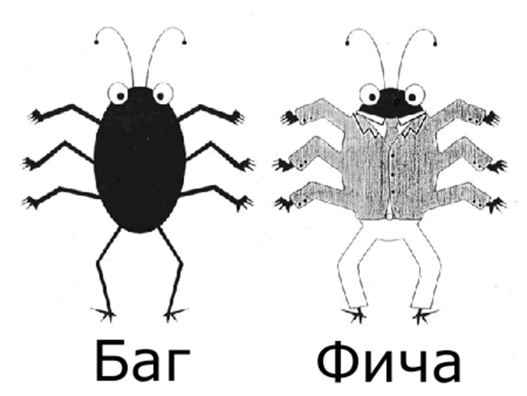

There are eternal questions of any tester: "Report a bug or not to? Is it a bug or a feature?"

Bug
To begin with, let's find out, what is a notorious bug, and what is such impertinence - a feature?
Bug (like beetle) is a widespread among programmers notation for errors in programs.
We need to distinguish a bug from a glitch, which is neither more nor less than a symptom of a bug causing a neuro-hysterical reaction of a user.
Также имеется производное от «баг» понятие «бага». «Бага» — то же самое, что и «баг», только женского рода. Считается, что фиксить «багу» приятнее, чем «баг».
The term "bug" is usually used to define errors occurring during the work of a program, as opposed to, for example, design errors or syntax errors.
Feature is usually used in the relation to an application in a program: "Important feature of the program is the ability to export a report in an Excel table".
It is also known, the phrase «this is not a bug, this is feature» (sometimes «bug-feature»). In this way, any documented bug, which does not influence on the program performance (even influencing — also not uncommon), goes in the category of functionality (features). As the example of such «bug-feature» was the unbelievable opportunity in Windows 98 to restart Windows without restarting a PC. It was to click «restart» in the «shutdown» window and to press Shift. It used to significantly save time for restarting, but at the same time it was the bug.
Bug report writing

Bug report - a technical document and thus should be written using technical language. Right terminology is to be used when using names of elements of users' interface (editbox, listbox, combobox, link, text area, button, menu, popup menu, title bar, system tray, etc.), users' actions (click link, press the button, select menu item, etc.) and results have been obtained (window is opened, error message is displayed, system crashed, etc.).
Requirements for mandatory fields of bug reports
Mandatory fields of bug reports are: brief Bug Summary, Priority, Steps for Reproduction, Actual Result, Expected Result.
Below are the requirements and examples for filling of these fields.

The principle of creating a bug report
The principle "Where? What? When?"
As an example of creating a bug report
Make a sentence, where facts about a defect are set out in the following sequence:
-
Where? Where in the user interface or the architecture of the software product is a problem. Moreover, start a sentence with a noun, not a preposition.
-
What? What is happening or not happening in accordance with specifications or to your idea of normal operation of the software. At this, indicate the presence or absence of the problem object rather than its content (its point in the description). If the content of the problem varies, all the known variants are specified in the description.
-
When? At what point of the program performance, by what event or the conditions, the bug occurs.
Difference between a bug and a bug report
You probably have a question - "what is the difference between a bug and a bug report?". Let us specify: a bug is an error in fact, but when a tester would describe it according to the rules it will turn into a bug report about which usually they say: "I found a bug," or "I recorded a bug." In addition, a bug report can include both one particular bug and all bugs found in the testing program / website / application.
Why is that? When you work with the trekking bug system, usually for every bug a separate electronic document is created (a bug report), and the same for each of them. And when you work without the trekking bug system, bugs are described either in a text document or in a table and all the other bugs found are recorded there. Why would you create a separate file for each bug?
Many people believe that all the testing is reduced to find bugs, but we found out in the first level that it is not so. But let us not diminish the value of this work. Finally, 80-90% of the work of a tester is finding of errors. But it is important to remember one thing - a tester is not appreciated for bugs found, but for not missed bugs. That is, a failure - is when people find defects in the resulting product, especially if they interfere with the business process. Missing bugs that are difficult to catch, or they affect on a very small number of users - is not considered as a failure of a tester.

A bit more about bug report
-
Tracking algorithm of defects (taking into account the steps for processing the error message) can vary from project to project.
-
-
Recommended scheme of an error tracking:
-
A tester records an error message and addresses it to a leading tester, prespecified the priority of an error.
-
-
Leading tester checks completeness of the error description (references to the requirements, screenshots, tracking data of a system or an application) and the reproducibility of the situation that resulted in a failure, and clarifies the priority and translation errors in the development team.
-
-
Back tracking is made in a reverse sequence through all the steps of a tracking way.
-
Description of an error (bug, defect report) is, along with a testing report, the main artifact, for which a tester is responsible
-
-
Recommended form of the error descriptions for systems, oriented on the implementation of an interactive dialogue with a user:
-
What I did
-
What I excpected
-
What I got
-
-
Types of defects are related to types of testing that were carried out to identify them (level 2). There are still defects caused by violation of the coding agreements, user interfaces, and other standards.


Mesa think you are tired, but dha forces of evil are on dha alert and yousa should prepare well. Try to inspire yourself and focus

Main fields of a bug report
Brief Summary
Short description of the problem, clearly indicating the cause and the type of the error.
Project
Name of the testing project
Component of an application
Name of a part or a function of the testing product
Version
Version, in which an error has been found
Priority
The most widespread is the five-level system of grading the severity of a defect:
-
P1 Blocker
-
P2 Critical
-
P3 Major
-
P4 Minor
-
P5 Trivial
(see details below in the section "Defects prioritization")
Severity
Severity of a defect:
-
S1 High
-
S2 Medium
-
S3 Low
(see details below in the section "Severity gradation")
Status
Bug status. Depends on bug workflow and life cycle
Author or Reporter
Name of a bug reporter
Assigned To
Name of the employee assigned to solve the problem
Environment
OS / Service Pack and so on / Browser + version / ...
Information about the environment, where a bug has been found: OS, Service Pack, for a WEB testing - name and version of a browser and so on.
Description
Steps for Reproduction
Steps that easily allow to reproduce the situation had caused the error
Actual Result
Result obtained after steps for reproduction
Expected Result
Expected right result
Дополнения
Attachment
File with tracking data, screenshot or any ther document that may be releveant and helpful for understanding the cause of a problem or finding a solution of the problem
Приоритезация дефектов

Defects prioritization
Gradation of Defects Priority.
-
Blocker
Blocking bug causing inoperable state of a program and resulting in that the further work with the system under testing or its key functions becomes impossible. A solution is necessary for the system to continue its functioning.
-
Critical
Critical error, key business logic working inappropriate, a hole in a security system, a problem caused temporary failure of a server or some part of a system without the opportunity of its solving using another entry points. A solution is necessary for further work with key functions of a testing system.
-
Major
A significant error, or a standard bug is assigned when the main part of a business logic is not working properly. This error is not critical, or there is the opportunity to work with the test function using other entry points.
-
Minor
A minor bug that violates the business logic of an application under test or an obvious user interface problem.
-
Trivial
Common error, not related to the business logic of an application, a poorly reproducible problem, an unobtrusive user interface error, a problem of third-party libraries or services, a problem that has no effect on the overall quality of the product.
Gradation of Defects Severity
-
S1 High
Must be fixed as soon as possible, since it is critical for a project.
-
S2 Medium
Must be fixed, but is not critical.
-
S3 Low
Must be fixed, but is not critical and may be solved later.
Thus, the sequence in the priority of corrections is:
High -> Medium -> Low



Major errors in preparations of bug reports
-
Lack of data provided
Not always one same problem occurs at all input values and any logged-in user, so it is strongly recommended to make all the necessary data to the bug report.
-
Determination of priority and severity
Very often there is the over or underestimation of the severity of a defect, which can lead to the wrong priority when solving problems.
-
Description language
Wrong terminology or too complex speech patterns are often used when describing a problem and can introduce human error, responsible for solving the problem.
-
No expected results
In cases where you do not specify what should be required for the system behavior, you waste developer's time to search this information, thus slow down the correction of a defect. You must specify a point in the requirements, written test case or your personal opinion, if this situation has not been documented.
People responsible for the design of fields in bug reports

Working with defects
(Tracking by status)

На схеме изображен классический алгоритм обработки бага. Баги заводить может кто угодно, но обычно это тестировщик или саппорт (второй вариант плохой). После создания баг получает статус "new" и идет на проверку, получая статус "in review". Уточним, что не во всех компаниях делают баг-ревью, и тогда тестировщик сразу переносит баг в состояние "open". В случае ревью баг могут закрыть (если он не актуален), либо передать в отдела разработки для исправления, тот же "open". После исправления багу присваивается статус "resolved" и тестировщик приступает к проверке качества исправления дефекта. Тут два пути: вернуть на доработку со статусом "reopen" либо закрыть баг. В некоторых случаях можно даже переоткрыть закрытую багу, если она вдруг воскресла в новой версии.
Resolution - причина присвоения статуса
Статусов в жизненном цикле дефекта ограниченное количество, а для того чтобы описать причину того или иного статуса использую резолюцию. Она объясняет причину установки статуса. Ведь все баги будут в конце концов закрыты, но причины закрытия у всех разные. Что-то исправили, что-то отложили, а кое-что и вовсе оказалось не багом. Выбор резолюций на проекте зависит от методологии разработки ПО. ДАвайте рассмотрим стандартный набор резолюций:

Fixed/Resolved -Best status - bug is fixed : )
As designed/By design - suggested bug is a feature
Cannot Reproduce - bug don't reproduce, we need to re-check it and specify the description or to close, if it cannot be reporduced
Deferred/Postponed - was put on ice
Obsolete/Not relevant - bug is not relevant anymore and it is time for it "to retire"
Not a bug - has been not considered as a bug
Duplicate - there is already such a bug, one of them should be closed
Won’t fix - they don't want to fix it for some reason, for example it is of too small impact for users at high complexity of its fixing
Incomplete - unfinished bug - blasphemy of and blame for to the tester, who returned a bug with this status because he was unable to describe it right
Merged - fixing is merged with other functional, or a task is included in the main code and is no longer separate
SF Closed - it also happens, bug has self-destructed
Statuses can be others in a particular company, and listed above statuses are standard.
Serious jokes

Bugs are classified according to their degree of hazard:
-
showstoppers
-
serious
-
small
-
trifle
-
knocks of testers
By frequency of appearance:
-
constant
-
sometimes (most lousy type of bug, «floating»)
-
only on customers machine
Also, bugs are classified by who and where observed symptoms. For example, if a bug was noticed by Mega-boss of All Customers on an already running system, then the bug will be fixing by whole IT-department, including the cleaning lady during all weekends.
The most pleasant bugs — showstoppers that were found on a Friday night. They will give an incredible pleasure for any programmer, who loves to leave the office on Saturday morning.
Bugs in large quantities are produced by the Chinese and Indians, as well as various code monkeys. Products containing the overdose of these bugs are called bug-dromes.
There is a special mantra: "This is not a bug, this is a feature" that allows you to get rid of the bug with minimal losses, that is, doing nothing. However, this magic possess only the most experienced programmers.
Combative instructions
Before you begin to handle bugs, review the example of parting priorities for bugs. That is, assign each bug the priority. Let's also clarify, that in our classification priority is primary, and severity is secondary. It means that the bug priority is determined first, and each priority, in turn, is divided into three levels of severity to allocate a bug among its friends. For this example, bugs were taken from the site for the purchase of cookies (Level 4).

Blocker
When buying cookies you click "Add to Cart" and then you turn out to be at some unexpected page. There is no opportunity to go to a page with a shopping cart. No workaround

Critical
There is no way to buy a piece of candy on a stick (the specific form). At clicking "Buy" nothing happens. Console error "Unexpected error" appears, the quantity of goods in a basket does not increase

Major
The gallery of cakes on the home page does not reproduce one of the images. Eternal pre-loader is spinning. Playback steps: scroll through the gallery by 5 pictures...

Minor
Spelling mistake in the link "buy cookies naw" on the home page

Trivial
Link "buy cookies naw" on the home page does not change its color when you click on it. OR: Clicked links are purple
Видеоурок - все о баг репорте на практике

Practice
Practice task

Greetings, my student! I want to thank you for the excellent testing. I really liked the bugs that you sent to me, so I want more bugs!
But now, when you know all about bugs, they must be perfectly handled.
So, the task:
Test the site and find all bugs. Make your bug report according to the example.
This is the easiest site that you've tested, so there will be 2 equivalent evaluations:
for defects found and accuracy of bug report - correct description and priority, and so on.


Acquainted with some programs, you should get,Young Tester. Record video and screenshots for bugs, Jiing and Joxy - important programs that will help. Download and install, screens in the form of test plan from R2D2 send or add to bugs. Herh Herh Herh Herh! Yeesssssss!


Level 6
Для перехода на уровень 6, необходимо набрать минимум 18 балла (60%) за задания уровня 5.